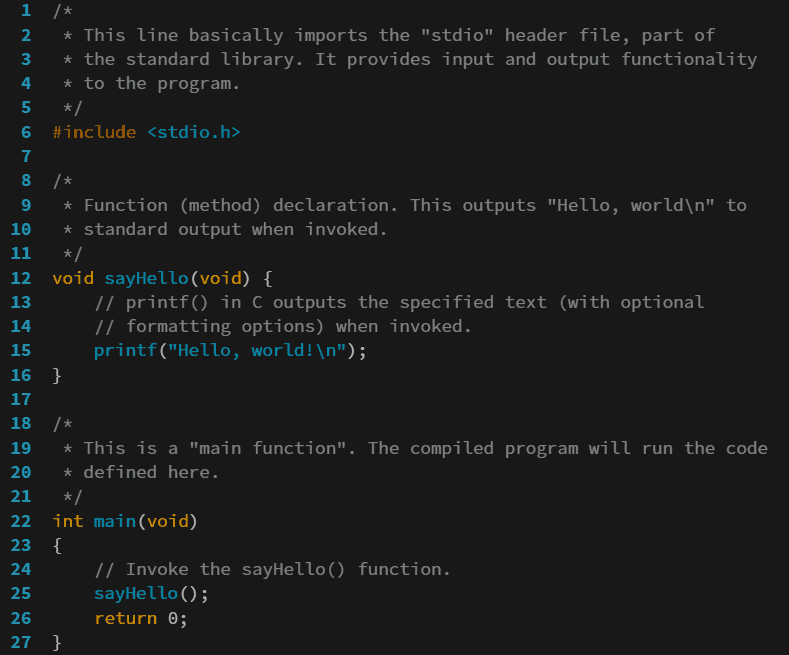
Learning to program used to mean sitting at a desk in front of a desktop computer, but that is no longer the only way to start. Today, a phone in your pocket can be a complete programming workspace, and cxxdroid is one of the most practical tools for turning an Android device into a C and C++ development environment. It combines a code editor with a real compiler, so you can write a program, build it, and run it without touching a laptop. For students, hobbyists, and busy professionals, that freedom changes when and where coding practice happens.
The idea is simple but powerful. Commuting time, waiting rooms, and short breaks become opportunities to practise. Instead of reading about loops and pointers and hoping you remember them later, you can test them immediately. A small program that prints a message, sorts a list, or checks a condition can be written and executed in minutes. That short feedback loop is one of the best ways to learn a programming language, because mistakes become visible right away and fixes can be tried on the spot.
What Cxxdroid Actually Does
At its core, Cxxdroid is a mobile integrated development environment for C and C++. It provides an editor where you write source files, and it includes a compiler that turns that source code into a program your phone can run. When you press run, the app builds your code and shows the output in a terminal-style window, just as a desktop setup would. You can also pass input to your program, which is essential for practising problems that read numbers, names, or choices from the user.
An Editor Built for Small Screens
Writing code on a phone screen sounds awkward until the editor is designed for it. A good mobile editor offers syntax highlighting, so keywords, strings, numbers, and comments appear in different colours and the structure of the code is easier to follow. It also helps with indentation, so blocks inside loops and functions stay visually organised. Automatic bracket completion reduces typing errors, and a row of common symbols above the keyboard saves you from hunting through keyboard layouts for braces, semicolons, and operators.
Why a Real Compiler Matters
Some mobile tools only simulate code or run a limited subset of a language. A real compiler gives you confidence that what you learn is genuine. Standard library features such as input and output streams, vectors, strings, and file handling behave as they should. When you later move to a desktop compiler, your knowledge carries over without surprises. You are learning C++, not a simplified imitation of it.
Learning C++ on the Go
C++ is often taught as a first serious language because it teaches both high-level ideas and low-level details. You learn about variables, control flow, functions, arrays, and classes, but you also learn about memory, references, and pointers. Practising daily, even in short sessions, builds that understanding far better than occasional long sessions. A phone-based setup makes daily practice realistic, because the tool is always with you.
A useful routine is to pick one small concept each day. One day, practise loops by printing patterns. Another day, practise functions by writing a small calculator. Later, try structures and classes by modelling a simple student record or a bank account. Each exercise should be small enough to finish, because finishing builds momentum. Over weeks, those small exercises add up to genuine skill, and you will have a folder of working programs to prove it.
Students preparing for exams or interviews benefit in the same way. Common topics such as sorting, searching, recursion, and string handling can all be practised on a phone. Writing the code yourself, rather than only reading solutions, is what makes the difference in an interview. When you can explain your code and fix it under pressure, you stand out, and that confidence comes from repetition.
From Practice Programs to Small Projects
Once the basics feel comfortable, small projects are the next step. A number-guessing game, a to-do list stored in a file, a simple grade calculator, or a text-based quiz are all excellent projects for a mobile setup. They force you to combine input, output, loops, conditions, and functions into something that feels complete. They also teach debugging, because a project always contains a few surprises that a single exercise does not.
Tips for Getting the Most Out of Mobile Coding
First, keep sessions focused. Short, regular practice beats rare marathon sessions, especially when you are learning. Second, type code yourself instead of copying it. Typing forces you to notice every symbol, and noticing is how you learn. Third, when an error appears, read it carefully before changing anything. Error messages point to a line and describe a problem, and learning to interpret them saves hours of guessing.
Fourth, save your work with clear names, so you can find a program again later. Fifth, revisit old programs after a week and try to improve them. You will often see a simpler way to write the same logic, and that is a sign of progress. Finally, use the official resources when you want to go further. You can download the app and read its documentation through cxxdroid.com, which is a good starting point before you explore tutorials and reference material.
Who Should Try It
This kind of tool suits several groups. Students who cannot always access a computer lab can keep practising at home. Working adults who want to learn programming in spare moments can make real progress without buying new hardware. Hobbyists who enjoy building small utilities can prototype ideas anywhere. Even experienced developers sometimes use a phone setup to sketch an algorithm or test a snippet before opening a full project on a computer.
Final Thoughts
Programming skill comes from writing programs, running them, fixing them, and writing more. A mobile C and C++ environment removes excuses by putting that whole cycle in your pocket. Start with a hello world program, move on to loops and functions, then build small projects that solve real problems. With steady practice, the phone that you already carry everywhere becomes one of the best learning tools you own, and the language you learn on it will stay useful for years.